StoresFlowby SmartFACT

STORESFLOW · INVITED TRIAL

How to receive goods against a purchase order

Updated

Receiving goods against a purchase order means checking a delivery against the order line it fulfils and recording what actually arrived. StoresFlow records the physical stock receipt against a SmartFACT Purchasing order line, so a part delivery leaves the rest still to come.

StoresFlow expected deliveries lists PO-58214, line 1, M6 screws from Pennine Fasteners and twenty each outstanding on a handheld or scan station.
Check the supplier order line and its outstanding quantity on a handheld or scan station.

Find the expected delivery

Open the expected receipts and choose the supplier order line. Check the material and what remains outstanding before entering a receipt.
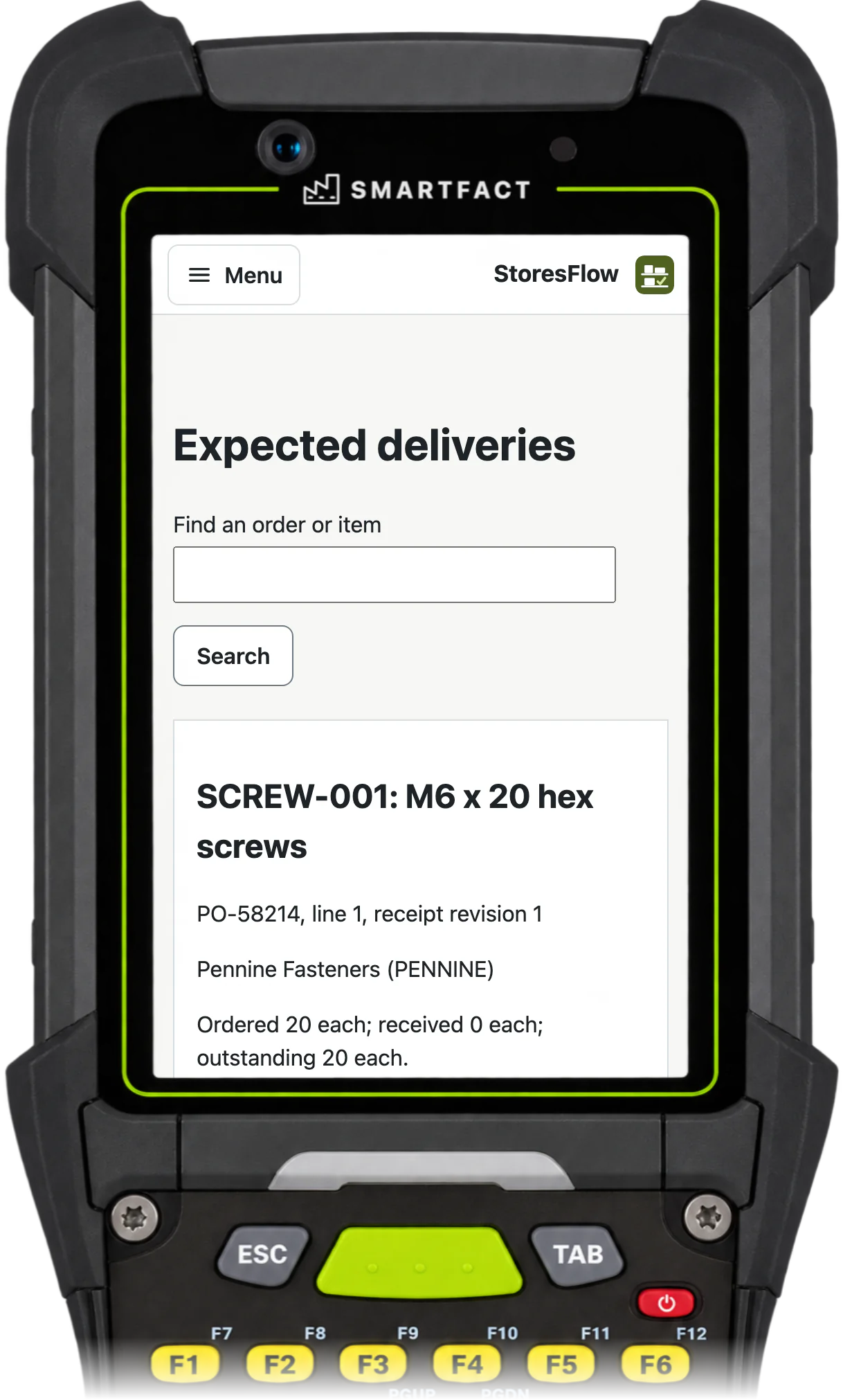
Find the expected delivery On a handheld or scan station.

Check the bin and delivery reference

Confirm the actual home bin and keep the supplier’s delivery reference. Selecting an item or printing a label does not move stock.
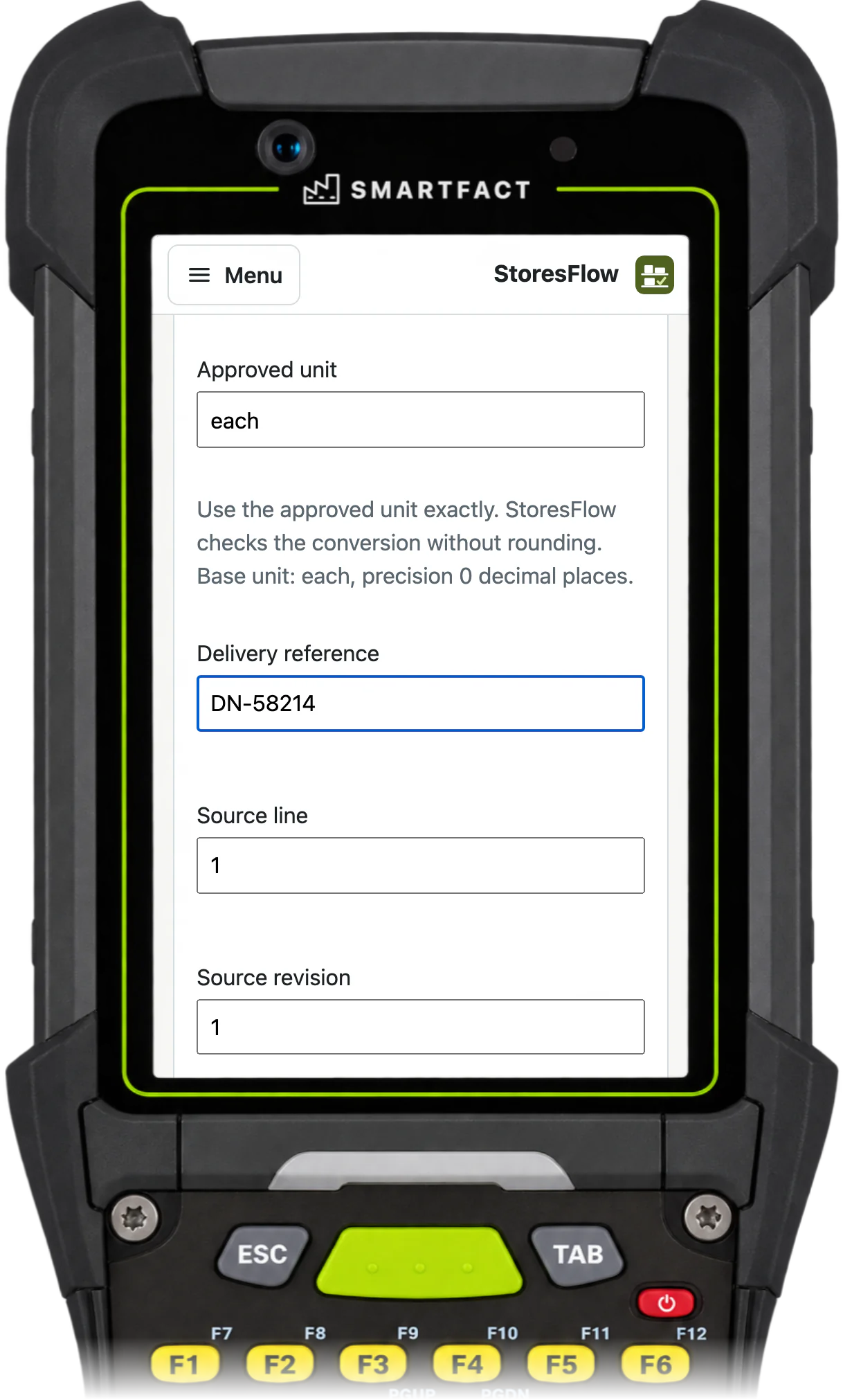
Check the bin and delivery reference On a handheld or scan station.

Record the quantity that arrived

Here six pieces arrive against twenty outstanding. Record six, then check the material, unit and bin. A checked form has not posted the receipt.
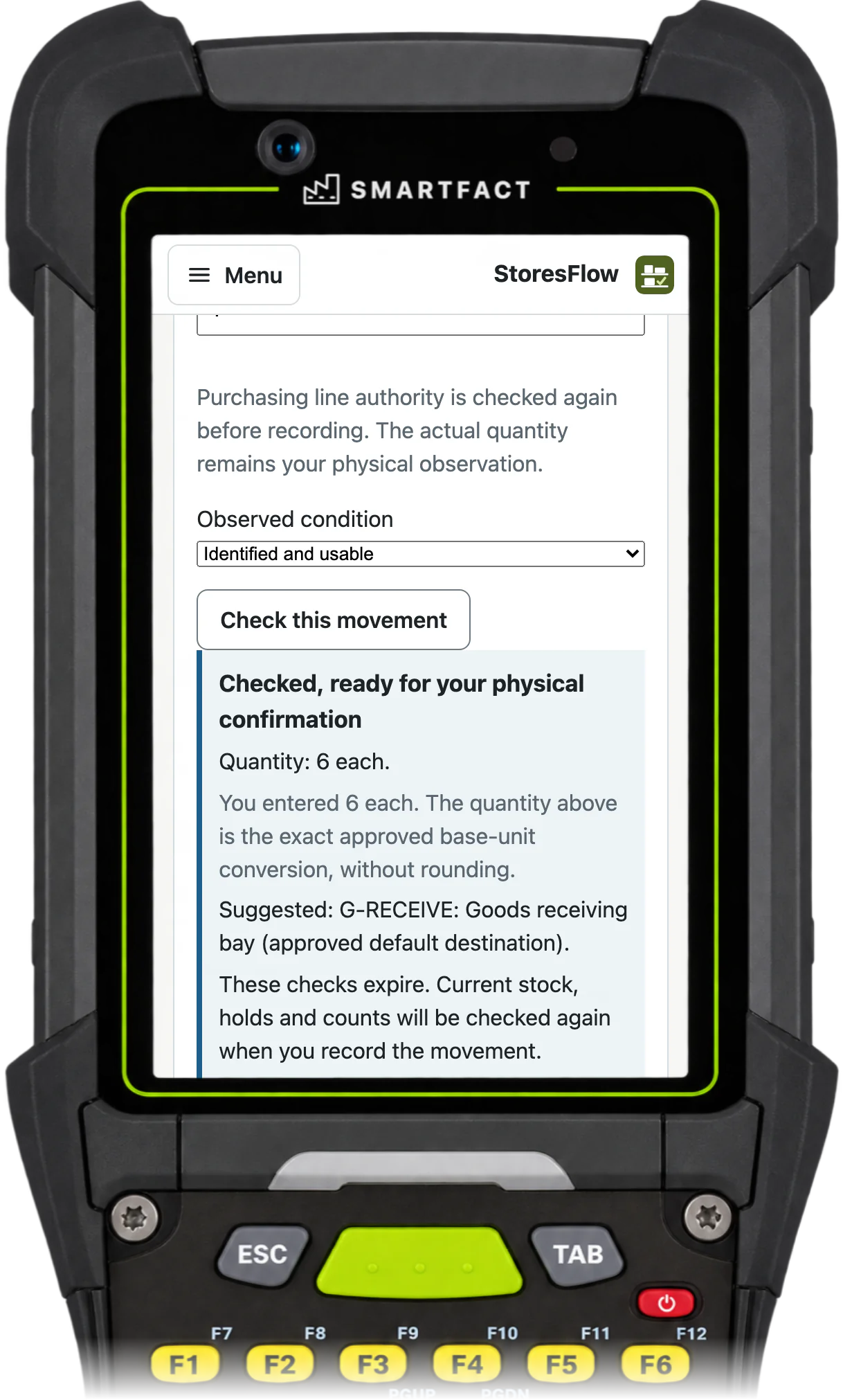
Record the quantity that arrived On a handheld or scan station.

Confirm the physical receipt once

Confirm only the goods and placement you checked. The receipt retains the original order line; a part delivery leaves the rest open. If a reply is uncertain, check the original action before repeating it.
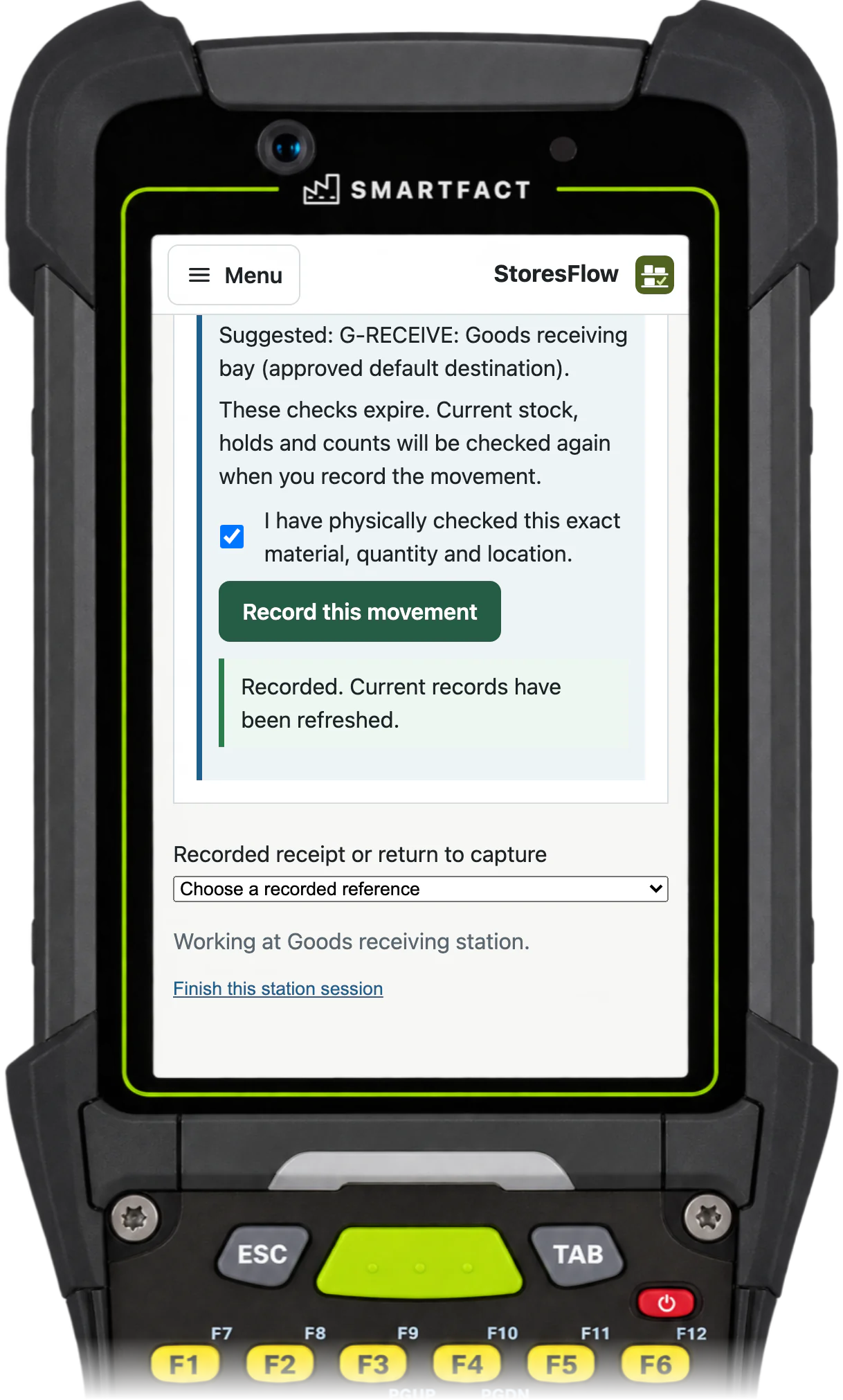
Confirm the physical receipt once On a handheld or scan station.

What StoresFlow does not do

  • Purchasing owns the purchase order. StoresFlow owns physical stock and receipts.
  • No invoice matching, payment, valuation or MRP.
  • One agreed stockroom at one site, with StoresFlow as its only stock record.

Common questions

Can I record a part delivery?

Yes. Record the quantity that physically arrived. The remainder stays outstanding on the order.

Does scanning confirm receipt?

No. A scan finds the item, line or bin. A person confirms the actual physical receipt and placement.

Does this match or pay the invoice?

No. Your accounts team handles invoice matching and payment.

Trials are by invitation and start with one agreed workflow. Scope and arrangements are agreed with you before access.

INVITED TRIAL

Where does your stock record go wrong?

Tell us how material is received, stored and issued today. We arrange a demonstration and discuss whether an invited trial for one stockroom fits your process.

Request a trial

By invitation. No payment or self-service sign-up.

THE SMARTFACT SUITE

Useful on their own.
Better around the same floor.

Automate factory decisions with rules you describe in plain English. Explore focused SmartFACT services, plus free tools for everyday checks.

Free tool

ScannerBench

See the text and key events your keyboard scanner sends. Compare them with the value you expected.

Test a scanner
Free tool

PrintBench

Print a known PDF, measure its reference marks and compare scans from the printed codes.

Check a print
Free tool

CardBench

Create 100 × 50 mm bin and rack cards with Code 128 or QR, from one record or a CSV.

Make bin cards
Free tool

CountBench

Count stock by location with a barcode scanner, compare it with a stock file and export the results. No account needed.

Start a free count
Free tool

BarcodeBench

See exactly what a scanned barcode contains, with hidden characters shown and GS1 fields, check digits and dates explained. No account needed.

Inspect a barcode
Free tool

MatchBench

Scan a reference and each label, see an exact match or the first difference, and download the results. No account needed.

Start a free comparison
Free tool

TagBench

Scan an item or location, note what needs attention, print a review tag and keep a review list. No account needed.

Make a free tag
Free tool

FindBench

Load your own parts and locations CSV, scan a code and see every location it lists. No account needed.

Start a free lookup
Free tool

ManifestBench

Check cartons, pallets or serial numbers against a list with a phone or scanner and see what is missing. No account needed.

Start a free check
Free tool

FeedBench

Check CSV and JSON files exactly as written, preview a column mapping and compare two versions by key. No account needed.

Check a file free
Free tool

CycleBench

Time work cycles and changeovers on a phone, record interruptions with reasons and download the results. No account needed.

Start a free study
Free tool

OffcutBench

Label the offcuts on your rack, find a piece long enough before cutting new stock and record what you used. No account needed.

Track offcuts free
Free tool

TraceBench

Load one or two CSV exports and follow a lot or serial forwards or backwards, with the row behind every link. No account needed.

Start a free trace
Free tool

ReclaimBench

Record the parts recovered from each return, label them with a QR code, check them and record the unit each one goes into. No account needed.

Track recovered parts free
Invited trial

LabelRules

Describe label rules in plain English. Automatically select layouts, resolve customer codes and check each job before printing.

Explore LabelRules
Early access

KitProof

Turn plain English component rules into automatic kit checklists, then check scans against the expected parts and quantities.

Explore KitProof
Early access

WorkSteps

Turn plain English rules into automatic step selection for each unit, with required evidence and a record of completed work.

Explore WorkSteps
Early access

FactorySpec

Apply approved product rules and calculations automatically to turn dimensions and options into manufacturing requirements.

Explore FactorySpec
Early access

SmartFACT Data

Maintain reference tables with ConfigSheets or bring shop orders into SmartFACT through reviewed connectors. Check changes and deliver data to the products that use it.

Explore SmartFACT Data
Early access

OrderRun

Turn plain English rules into automatic order checks and destination selection, with controlled production release.

Explore OrderRun
Early access

ParcelOffice

Scan the work order and the parcel choice to book the courier and print the labels. Approved plain English rules recommend or choose the parcel.

Explore ParcelOffice
Early access

RefillFlow

Scan an empty container to send the right refill request to stores. Approved plain English rules set the stores queue, priority, ticket printer and escalation.

Explore RefillFlow
Early access

RemnantRack

Label each offcut, find a suitable length before cutting new stock and record what you used. Approved plain English rules decide what to keep and where it goes.

Explore RemnantRack
Invited trial

ToolCustody

Check a shared tool before handover, record who has it and keep damaged or overdue tools out of the next issue. Explore an invited trial for one factory crib.

Explore ToolCustody
Invited trial

StoresFlow

Receive, put away, reserve and issue stores material with barcode checks, keeping held, reserved and available stock apart. Explore an invited trial for one stockroom.

Request a trial
Invited trial

LotTrail

Follow a lot or serial number through the records your factory already keeps, with the source of each link and the gaps shown. Explore an invited trial with two declared sources.

Explore LotTrail
Early access

CheckStation

Scan an identified unit to get its approved final-inspection checks, then record exact readings with their result, holds and release history.

Explore CheckStation
Invited trial

ReclaimStation

Book returned units in, recover and label the usable parts, release them independently and record the unit each goes into. Explore an invited trial for one product family.

Explore ReclaimStation
Free tool

GuidBench

Generate GUIDs, UUID v4 and v7, ULIDs and Nano IDs, format and download batches, or inspect a UUID in your browser. No account needed.

Generate identifiers
Free tool

OctetBench

Inspect and edit text, hex, Base64 and binary bytes in your browser, reveal hidden characters and compare byte sequences. No account needed.

Inspect some bytes
Free tool

PatternBench

Test JavaScript regular expressions in your browser, inspect matches and captures, preview replacements and check expected cases. No account needed.

Test a pattern
Invited trial

SmartFACT Purchasing

Collect purchase requests, approve supplier orders and track what is still to arrive. Explore an invited trial for one site.

Explore Purchasing
Help

SmartFACT Help

Step-by-step guides and interactive demonstrations for the SmartFACT suite. Read the instructions, watch a task or practise with real product screens and sample data.

Open SmartFACT Help